My Recipes, Revisited
TLDR; My recipe list and grocery list are integrated, so that each recipe reports whether I have all the ingredients required to prepare it.
2 Problems
Last year I wrote about how I organize my recipes. I found that it had two problems.
First, adding a recipe took too many steps: for each recipe I’d copy a link in, select an icon, write notes, estimate preparation times, and maybe list a few critical ingredients. I might do this all if I was sitting at my computer, but not if I was on mobile. If I found a recipe in a cookbook, there was little chance it would make it in.
Second, and more importantly: the list was a good place to put recipes, but it didn’t surface many recipes we that we loved.
To solve this I implemented a number of changes: I linked my grocery list and recipes, made grocery items aware of ingredient substituions, changed the columns associated with my recipes to be more descriptive, and created new views to help me find relevant recipes in a variety of situations.
The Grocery <–> Recipe Connection
The biggest change I’ve made is linking each ingredient in each recipe to a matching grocery item. Since each grocery item is marked as either In Stock, Running Low, or Out of Stock, each recipe reports whether I have all ingredients required to make it.
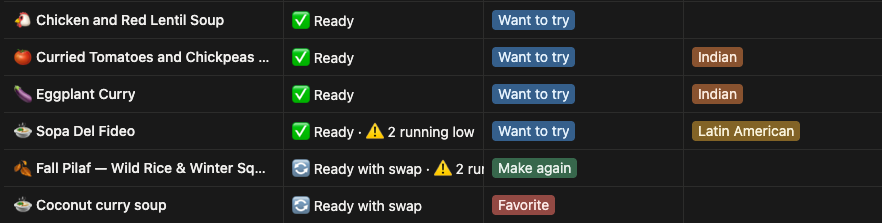
Visually, each recipe shows a pantry status: ✅ Ready (I have all ingredients), 🛒 Need 1, with the missing item named, and even ⚠️ 1 running low if a grocery item needed is marked as Running Low. The important ingredients column from last year’s post was a hand-written,static, approximation of this. Now it’s automatic, and it works in both directions: every grocery item lists the recipes that use it, so the half bunch of dill in my fridge can tell me what to do with it.
Substitutions
Grocery items also know about substitutions. For example, canned tomatoes know that they can stand in for fresh; whole cumin covers ground cumin because I own a grinder; kale can substitute for spinach.
When a swap is in play, the recipe shows 🔄 Ready with swap and names it, so I can decide whether it’s a swap I actually want.
Sub-recipes
Since some ingredients I might buy or prepare myself, for example harissa, kimchi, pickles, preserved lemons, seitan, or a salad dressing–those items are linked to their recipes. When the harissa jar runs out, the chili that needs it links me to my harissa recipe.
Ingredient Linking With Claude
While this all may seem like a lot of work, it is. Except that I had Claude do most the linking for me. What is even better is that I discovered that I can take pictures of recipes in my cookbooks, send them to Claude, and have it add the recipe to Notion with all the ingredient extracted, matched up to my grocery items when possible, and linked to the recipe.
Improving the View
The new Recipe <–> Grocery links enabled much more powerful recipe views.
Weeknight. Mains and soups that can be made in under an hour, sorted so that recipes I have all ingredients for show up first. Then, I added a sort for things I haven’t made in a while to keep my menus fresh.
Friday candidates. We host a lot, and Friday is when I try something new. This view is the Want to try pile, split into mains, sides, and desserts, with no time limit. I shop Friday mornings, so a recipe that requires ingredients I don’t have is fine here.
After Cooking. This is a view of my grocery list. Each time I prepare a recipe, I clikc a Made button, which tags all ingredients for that recipe. When I visit the After Cooking view, I get a list of all of those ingredients so that I can mark whether I need to buy more of each.
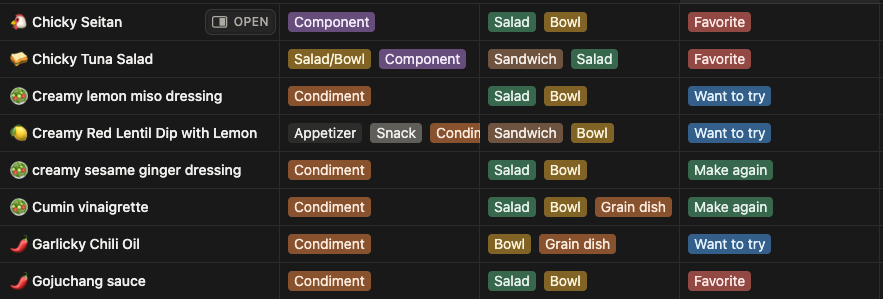
Lunch builder. My partner and I eat a lot of bowls and salads assembled from parts: leftover roasted vegetables, homemade seitan, whatever’s pickled. Components and condiments, like dressings, croutons, and seitan, are now tagged by where they go, so lunch is a matter of picking three things that are in the fridge.
Better Ratings
My old 1–5 stars never told me much. They’re gone; replaced by a status that answers a real question:
- Favorite — we loved this and I’d go out of my way to make it again
- Make again — solid and should be made again, but perhaps not prioritized
- If it’s handy — worth making if I’ve got the ingredients (and especially if I need to use them up)
- Want to try — the 🤷 of the old system
- Nope — won’t make again
A handful of other columns do the work the old tags did, but better: Who likes it? (one entry per family member), Leftovers, Lunchbox, Feeds, Make-ahead, and Activity, which is how much energy a recipe demands. Hyper, average, or lazy. On most weeknights, I’d prefer something lazy.
Still evolving, as always. If you’ve got ideas, let me know!
Happy cooking!
Enjoy Reading This Article?
Here are some more articles you might like to read next: